
A Step-by-Step Guide for Artists
Share your photography with art lovers around the world!
Art is Lit allows Artists to sell their digital photographs to buyers worldwide, without the need for physical delivery or automatic downloads.
Once a purchase has been confirmed, the Artist is responsible for emailing the original high-resolution photograph directly to the buyer or providing a secure private link for larger files.
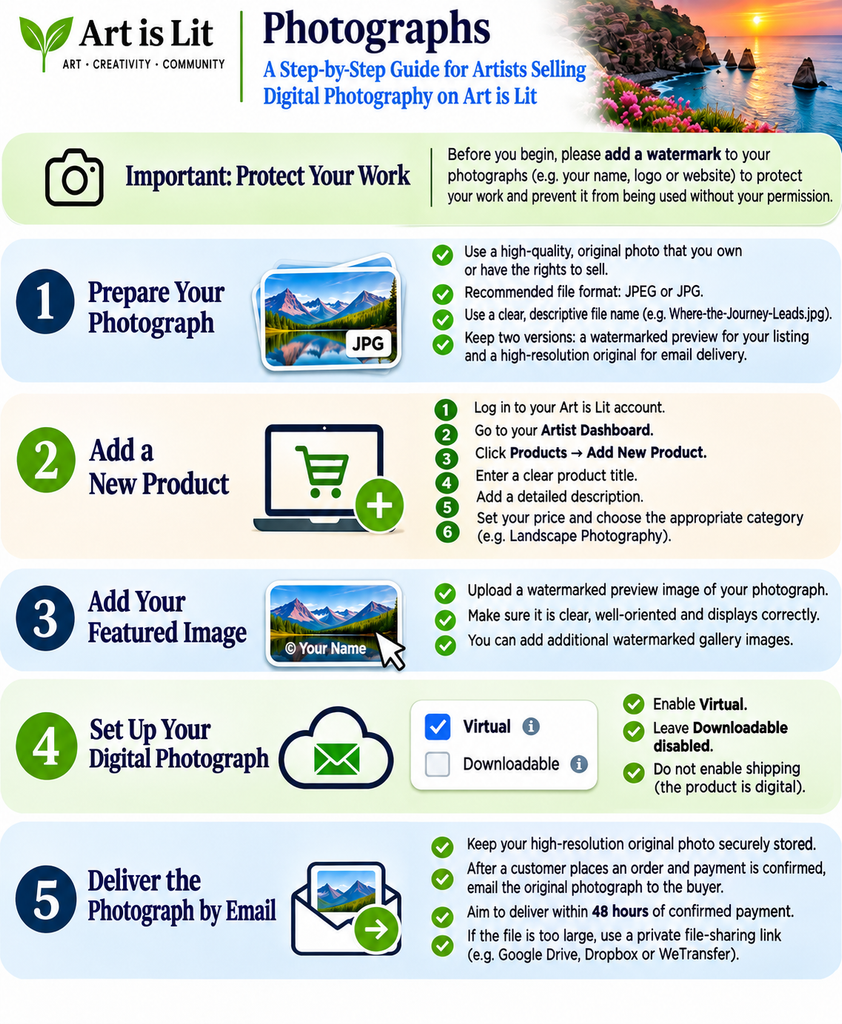
This step-by-step guide explains how to protect your photographs with watermarks, create your product listing, prepare your digital files, set your price, explain delivery arrangements and submit your artwork for approval.
Our aim is to make selling digital photography simple, secure and accessible, while allowing Artists to maintain control over their original work.
IMPORTANT – Protect Your Photography Before Uploading
Artists are responsible for protecting their own photographs before uploading preview images to Art is Lit.
To help discourage unauthorised copying or use, all Artists selling digital photography should add a visible but tasteful watermark to the photographs used as public previews on the marketplace.
Your watermark could include:
- Your Artist name or photography business name.
- Your personal logo.
- A copyright symbol (©) followed by your name.
Position the watermark where it can be seen without unnecessarily distracting from the photograph.
Please remember:
- Watermark your Featured Image and any additional Gallery Images before uploading them.
- Use smaller, web-optimised images for public display.
- Keep your original, high-resolution photograph securely stored on your own device or private storage, ready to send to the buyer after payment confirmation.
- The original photograph should normally be free from watermarks unless otherwise stated in your product description.
- Never upload your full-resolution, unwatermarked photograph as a public preview or attach it to your Art is Lit product listing.
Art is Lit does not automatically apply watermarks to uploaded photographs. Artists must prepare and protect their preview images before uploading them.
Watermarking can discourage unauthorised use, but it cannot completely prevent copying or misuse.
Important: Once payment has been confirmed, the Artist is responsible for delivering the purchased high-resolution photograph directly to the buyer by email or through a secure private file-sharing link, within the delivery timeframe stated in the product listing.pletely prevent photographs from being copied, downloaded or reproduced.
Step 1 – Prepare Your Photograph
Before uploading your photograph to Art is Lit, make sure it is ready for sale.
- Original work: Only sell photographs you own or have the necessary rights to license.
- High-quality file: Prepare a clear, high-resolution photograph suitable for its intended use.
- File format: JPEG or JPG is recommended for most digital photographs.
- File name: Use a descriptive name, such as
Where-the-Journey-Leads.jpg. - Privacy and permissions: Ensure you have any necessary permissions for identifiable people or protected content appearing in the photograph.
Prepare Two Separate Versions
1. Public Preview Image
Create a smaller, web-optimised version of your photograph with your watermark clearly visible.
This is the image visitors will see on Art is Lit when browsing your artwork.
Important: Always add your watermark before uploading your preview image to help protect your work from unauthorised use.
2. Original High-Resolution Photograph
Prepare the original high-resolution photograph that the buyer will receive after purchasing.
- The photograph should normally be free from watermarks.
- Keep the original file securely stored on your own computer or preferred storage service.
- Do not upload the original high-resolution file to Art is Lit.
- Once payment has been confirmed, you will be responsible for emailing the purchased photograph directly to the buyer.
Important – Protect Your Original Work
Always keep your public preview and original high-resolution photograph separate.
Only upload the watermarked preview to Art is Lit. Your original photograph should remain securely stored with you until it is ready to be delivered to the buyer.
This helps protect your artwork while keeping the selling process simple and secure.accessible.
Step 2 – Add a New Product
- Log in to your Art is Lit account.
- Open your Artist Dashboard.
- Select Products → Add New Product.
- Enter a descriptive title for your photograph.
- Add your product description, selling price and appropriate category.
For example:
Product title: Where the Journey Leads
Category: Landscape Photography
Product type: Simple Product, with Virtual enabled and Downloadable disabled. The photograph will be delivered directly to the buyer by email after payment confirmation.
Your description should explain what makes the photograph special, including its subject, atmosphere, location where appropriate, and artistic inspiration.
Step 3 – Upload Your Watermarked Featured Image
Your Featured Image is the photograph customers see when browsing Art is Lit.
- Find the Featured Image section.
- Upload your prepared, watermarked preview photograph.
- Check that the image is correctly oriented and displays clearly.
- Add additional watermarked photographs under Gallery Image, if useful.
Important: All publicly displayed photographs should already contain your watermark before uploading.
Do not upload the original high-resolution file in this section.
The Featured Image is used only to showcase your artwork. It is not the original photograph the buyer will receive. After payment has been confirmed, you will email the original high-resolution photograph directly to the buyer. your artwork. It is not the downloadable file that the customer receives after purchasing.
Step 4 – Set Up Your Digital Photograph
In your product settings, select:
- Product Type: Simple
- Virtual: Enabled
- Requires Shipping: Disabled
A virtual product does not require physical shipping because the photograph will be delivered electronically.
Important: Art is Lit does not require you to upload your original high-resolution photograph. You will keep the original file securely stored and send it directly to the buyer after payment has been confirmed.
Step 5 – Prepare Your Photograph for Email Delivery
Before submitting your listing, make sure your original high-resolution photograph is ready to send to a buyer.
- Keep the original photograph securely stored on your computer or preferred storage service.
- Make sure the file is correctly named and matches the photograph advertised.
- Check that the image is high quality and free from preview watermarks.
- Confirm that the file format and dimensions match those stated in your product description.
- Ensure you can access the file when an order arrives.
How to deliver large photographs
If your photograph is too large to attach to an email, you may use a private file-sharing service, such as Google Drive, Dropbox or WeTransfer.
Make sure the buyer can access the file without requesting additional permission. Use restricted access or an expiring link where available, and avoid publicly searchable links.
Important: Never send the original photograph before payment has been confirmed.
Step 6 – Understand Your Delivery Responsibilities
When selling digital photographs on Art is Lit, you are responsible for delivering the purchased file directly to the buyer.
- Check your artist dashboard regularly for new orders.
- Confirm that payment has been successful before sending the photograph.
- Send the original high-resolution photograph to the buyer’s email address provided with the order.
- Aim to deliver the photograph within 48 hours of confirmed payment.
- Keep a record of the delivery in case the buyer reports a problem.
If you cannot deliver within the stated timeframe, contact the buyer promptly and explain the delay.
Important: Never send photographs to an alternative email address without verifying the request.
Step 7 – Set Your Price and Inventory
Enter your selling price in pounds sterling (£).
For example: £5.00
In the Inventory section:
- Add a unique SKU if required, such as
PHOTO-001. - Enable Sold Individually if you want customers to purchase only one copy per order.
- You generally do not need to manage physical stock for a digital photograph sold without a fixed edition limit.
Remember: Limiting the quantity per order does not prevent a customer from purchasing again in a separate order.
Step 8 – Explain What the Buyer Receives
Your product description should clearly explain:
- That the photograph is a digital file delivered by email.
- The file format, such as JPEG.
- The image dimensions in pixels.
- The resolution and intended use, where relevant.
- Whether the purchase includes personal-use rights or another specified licence.
- That no physical print or frame will be delivered.
- Any restrictions on commercial use, reproduction or resale.
- The expected delivery timeframe.
Example description:
This purchase includes one high-resolution JPEG digital photograph, delivered directly to your email address by the artist within 48 hours of confirmed payment.
No physical print or frame will be shipped.
The photograph will be supplied without the watermark shown on the preview image.
This purchase includes a personal-use licence only. The photograph may not be resold, redistributed or used commercially without permission from the artist.
Only include specifications and licence terms that accurately describe your product.
Step 9 – Check Your Product Before Publishing
Before submitting your photograph, make sure:
- Your product title and description are complete.
- Your Featured Image contains your watermark.
- Any Gallery Images are also watermarked.
- Your original high-resolution photograph is securely stored with you and has not been uploaded to Art is Lit.
- Virtual is enabled and shipping is disabled.
- Your price and SKU are correct.
- Your image dimensions and usage rights are explained.
- Your email delivery timeframe is clearly stated.
- The buyer understands what they will receive.
Save or submit your product for approval according to Art is Lit’s publishing process.
Step 10 – How to Deliver a Photograph After a Sale
Once a customer purchases your photograph, you are responsible for sending the original file.
1. Check your order
Log in to your Art is Lit Artist Dashboard and open Orders.
Find the customer’s order and check that payment has been confirmed.
2. Find the buyer’s email address
Open the order details and locate the email address provided by the customer at checkout.
Use this address only for fulfilling the order and any necessary order-related communication.
3. Send the photograph
Email the original high-resolution photograph directly to the buyer.
If the file is too large for an email attachment, send a private download link instead.
Make sure the photograph matches the product description and is free from preview watermarks.
4. Confirm delivery
After sending the photograph, return to your Artist Dashboard and mark the order as Completed, if this option is available.
Where possible, add an order note confirming the date of delivery.
5. Keep a delivery record
Retain a copy of the delivery confirmation in case the buyer needs assistance or reports that the photograph was not received.
If the buyer experiences problems accessing the photograph, provide reasonable assistance or resend the file.
IMPORTANT INFORMATION FOR ARTISTS
Photography Protection: Artists are responsible for preparing and watermarking their public preview photographs before uploading them. Art is Lit does not automatically watermark photographs and cannot guarantee that publicly displayed images will not be copied or misused.
Original File Storage: Artists must securely store their own high-resolution photographs. Art is Lit does not host the original digital files for email-delivered photography listings.
Email Delivery: Artists are responsible for sending purchased photographs to buyers after payment confirmation, within the delivery timeframe advertised.
Copyright: Selling a digital photograph does not automatically transfer copyright ownership to the buyer. Clearly state the licence and permitted uses.
Customer Expectations: The photograph delivered must match the image, format, resolution and specifications advertised.
Digital Returns: Refer to Art is Lit’s current Returns and Refunds Policy. Digital purchases are not automatically excluded from cancellation or refund rights. Applicable consumer protection laws must be respected.
Taxes: Artists are responsible for understanding their applicable tax obligations. Tax requirements may vary depending on the artist’s location, registration status and the buyer’s country.
Respect for Other Artists: Never upload, sell or reproduce photographs belonging to another artist without the necessary rights or permission. to another creator without the necessary permission or rights.
Ready to share your photography?
Visit your Artist Dashboard → Products and add your next digital photograph to Art is Lit.

Tips for Digital Products
- 🔒 Watermark: Add your name, logo or copyright watermark to your preview images before uploading them to Art is Lit. This helps discourage unauthorised use of your work. Keep the original high-resolution file free of watermarks for buyers to download.
- 📸 Quality: Upload a clear, high-resolution file.
- 🖼️ Cover Image: Use an attractive preview of your work.
- 📝 Description: Clearly explain what the buyer will receive.
- 🗂️ Category: Choose the correct category.
- 💷 Price: Set a fair price for your digital work.
- 📁 File: Double-check you uploaded the correct file.
- ©️ Copyright: Only sell work you own or have permission to sell.
- 👀 Final Check: Review everything before publishing.