Welcome to the Art is Lit Artist Shipping Guide!
Before you start selling your artwork, it’s important to set up your shipping options so buyers know where you deliver and how much delivery will cost.
We’ve created this simple, step-by-step guide to help you set up your shipping without feeling overwhelmed.
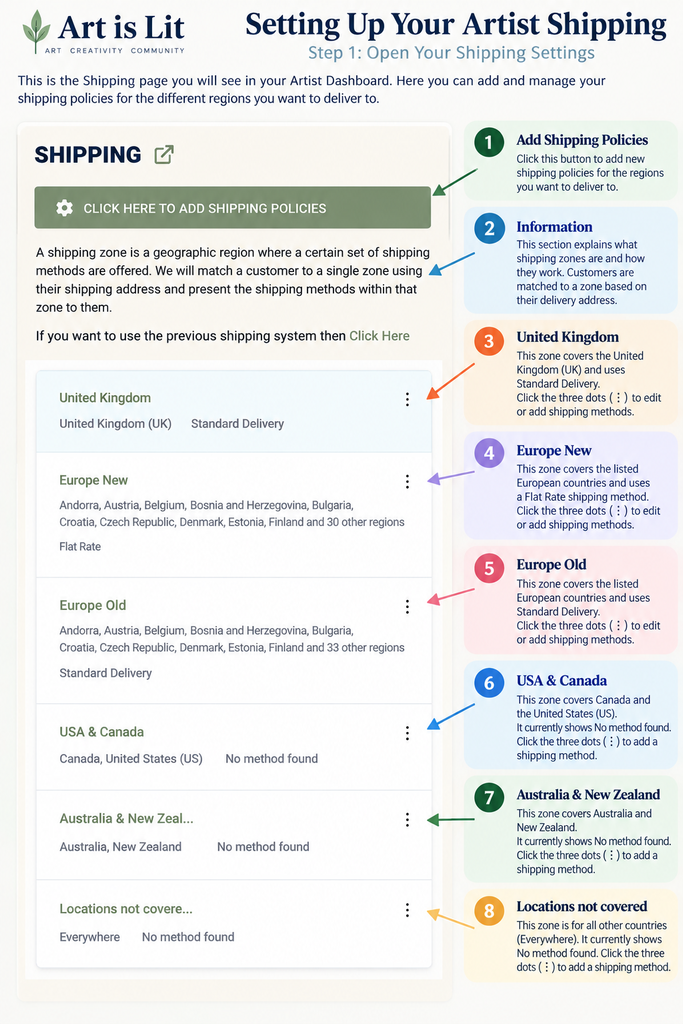
To get started, log in to your Artist Dashboard, open Settings → Shipping.
You’ll see the shipping zones available on Art is Lit, including the United Kingdom, Europe, USA & Canada, and Australia & New Zealand.
You can choose which regions you wish to deliver to and set your shipping methods and prices accordingly.
Remember: You don’t have to ship worldwide. Simply set up delivery for the regions that work best for you.
Follow the steps below, and you’ll soon be ready to send your artwork to your customers with confidence!
Where to Find Your Shipping Settings
At Art is Lit, you can choose the countries or regions you wish to ship to and set your own delivery prices according to the size, weight and packaging requirements of your artwork.
We’ve created this simple step-by-step guide to help you set everything up with confidence.
Where to Find Your Shipping Settings
- Log in to your Artist Dashboard.
- Open the main menu and select Settings.
- Click Shipping.
- You will see the available shipping zones, including the United Kingdom, Europe, USA & Canada, and Australia & New Zealand.
- Choose the region where you would like to deliver your artwork.
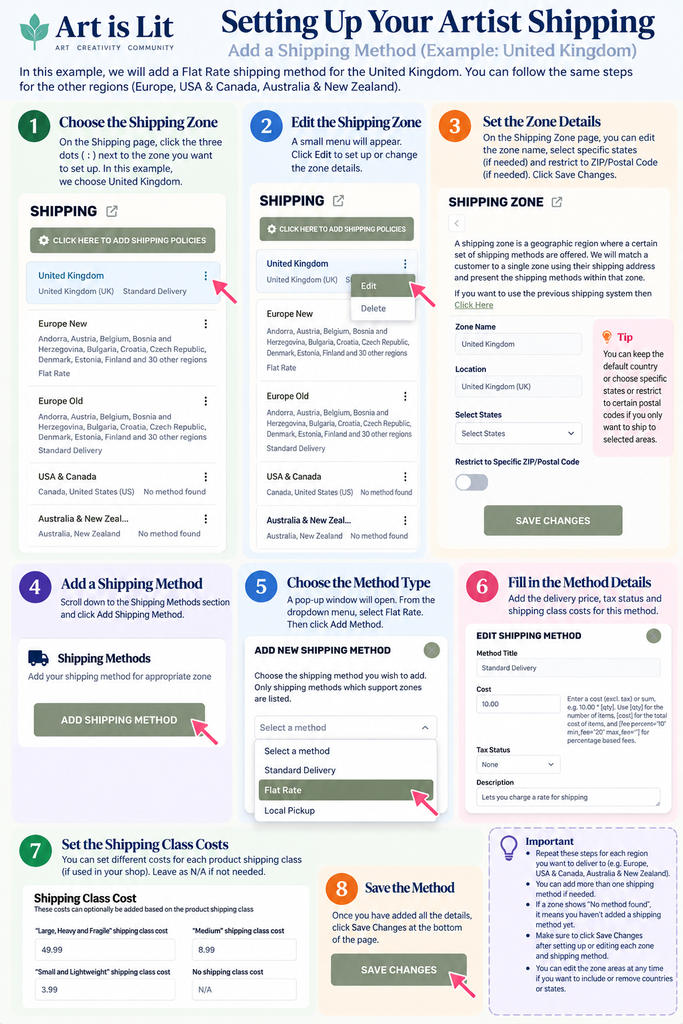
- Follow the illustrated steps below to add a Flat Rate shipping method, enter your delivery prices and save your settings.
Remember: You can return to your shipping settings at any time to update your prices, change your delivery areas or add more shipping methods.
Important: Make sure your shipping prices cover the cost of packaging, postage and any additional delivery expenses. We recommend using a tracked delivery service to protect both you and your customer.
Setting Up Shipping for Your Artwork
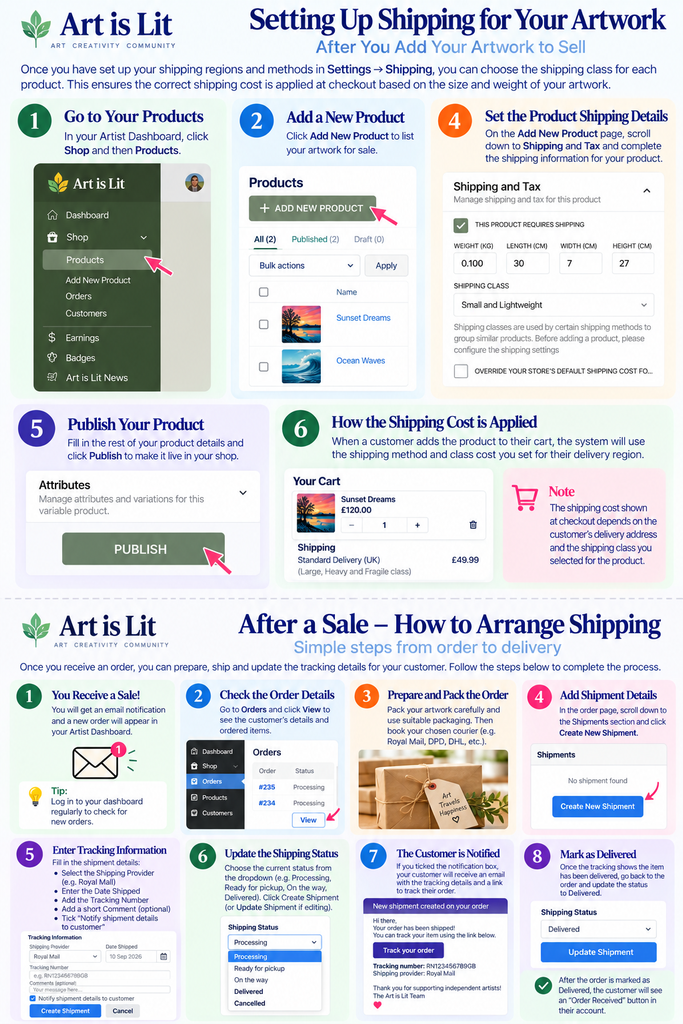
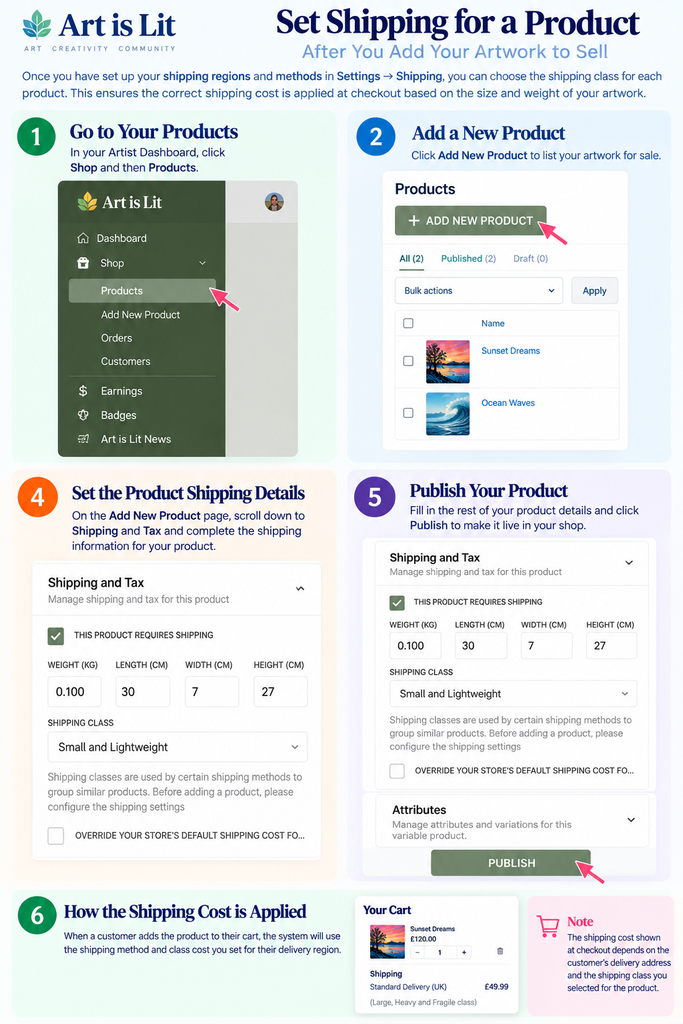
Once you have set up your shipping zones and delivery prices, the next step is to assign the correct shipping class to each artwork you list for sale.
This helps ensure that buyers are charged the appropriate delivery cost based on the size and weight of your artwork and their delivery location.
Follow the simple illustrated steps below to add your product’s shipping details. Remember to check the weight, dimensions and shipping class before publishing your artwork.
Tip: Always include the weight and dimensions of your artwork after packaging, so you can calculate delivery costs accurately.
After a Sale – What Happens Next?
Congratulations on your sale! 🎉
Once a customer purchases your artwork, you’ll receive an email notification, and the order will appear in your Artist Dashboard → Shop → Orders.
Your next steps are simple: check the order details, carefully package your artwork, arrange tracked delivery and add the shipping information so your buyer can follow their order.
Follow the step-by-step guide below to make the process easy and stress-free.